Counting a project's transactions is a great way to assess user engagement. The following query counts the daily in-game transactions for Crabada - the leading P2E game on Avalanche. To find transactions for a different project, change the chain_name and tx_recipient address.
SELECT  [signed_at:aggregation] as date
        , uniq(tx_hash) as transactions
FROM blockchains.all_chains
WHERE chain_name = 'avalanche_mainnet'
        AND tx_recipient = unhex('82a85407BD612f52577909F4A58bfC6873f14DA8')
        AND successful = 1
        AND [signed_at:daterange]
GROUP BY date
The following query will retrieve data from the all_chains data table.
SELECT * FROM blockchains.all_chains LIMIT 10
-- This will be quite a large query, so we will need to refine it a bit further!
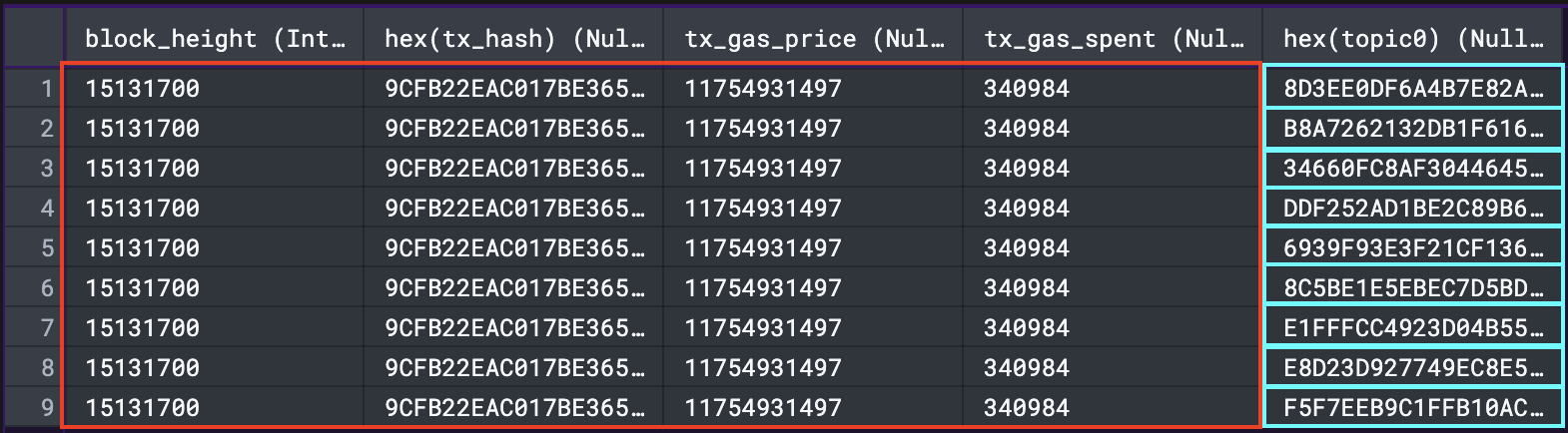
Each transaction has a unique transaction hash which can be found in the tx_hash column. Due to the all_chains table having all the block, transaction and log event data in one table it prints the same transaction hash (tx_hash) for each log event.
To count all unique transaction hashes, insert uniq(tx_hash) into the SELECT statement. uniq(tx_hash) is equivalent to count(distinct tx_hash) - just shorter 😉.
Increment's database also holds the tx_hash of unsuccessful transactions - add the following to the WHERE statement to filter out every unsuccessful transaction.
WHERE successful = 1
Whenever you want to query results from Avalanche you should use chain_name = 'avalanche_mainnet’ to help optimise your query.
-- Total Transactions for Avalanche
SELECT uniq(tx_hash) as tx_count
    FROM blockchains.all_chains
		WHERE successful = 1
		AND chain_name = 'avalanche_mainnet'
The query above will give you a single cell with the count of every transaction that has happened on Avalanche👇
Adding [signed_at:aggregation] as date enables you to pivot the date aggregation by day, month , year, etc. To read more on [signed_at:aggregation] and other parameter filters, click here.
-- Daily Transactions for Avalanche
SELECT [signed_at:aggregation] as date
	, uniq(tx_hash) as tx_count
    FROM blockchains.all_chains
		WHERE successful = 1
		AND chain_name = 'avalanche_mainnet'
As you can see in the image below, the Crabada: Game contract is always the recipient for in game transactions - as seen in the image below (to column). Therefore, you need to query the unique addresses in the tx_sender column where the tx_recipient equals the Crabada: Game contract.